


You can write the perfect email — clean copy, real value, a list of people who actually want to hear from you — and still watch it land in a spam folder nobody checks. Most of the time, the reason has nothing to do with what you wrote. It's about the IP address the message came from, and what that address has already told mailbox providers about itself before your email ever arrived.
This is the part of email infrastructure that's easy to overlook until it costs you something: invoices that never get opened, password resets customers never see, a marketing campaign that quietly underperforms for no obvious reason. If you're running mail from your own dedicated server rather than a managed email service, understanding IP reputation isn't optional background knowledge — it's the difference between mail that arrives and mail that doesn't.
What "IP Reputation" Actually Means
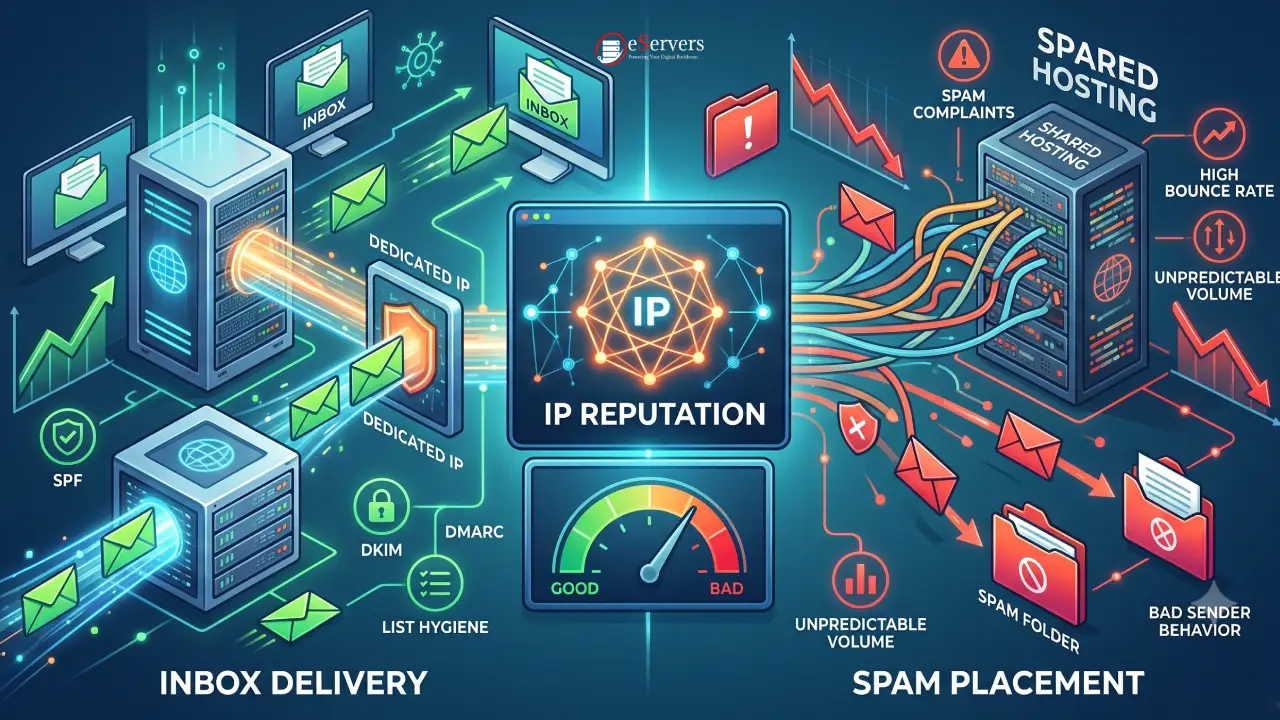
Every time your server sends an email, the receiving provider — Gmail, Outlook, Yahoo, whoever — checks more than just the content. It looks at the sending IP address itself and asks, in effect: has this address behaved like a trustworthy sender before?
That reputation is built from a handful of signals mailbox providers track continuously: how many recipients mark your mail as spam, how often your messages bounce, whether you're sending consistently or in sudden unexplained bursts, and whether your authentication — SPF, DKIM, DMARC — checks out cleanly. Email providers monitor these signals continuously, adjusting reputation based on how recipients interact with messages, which means reputation isn't a one-time score — it shifts with every batch of mail you send.
One benchmark worth knowing: staying below a 0.3% spam complaint rate is generally considered key to avoiding spam filters. Cross above that and providers start treating your mail with active suspicion, regardless of how legitimate it actually is.
The Shared Hosting Problem: Reputation You Don't Control
On shared hosting, your outbound mail typically leaves through the same IP address as dozens or hundreds of other accounts on that server. That arrangement has an obvious appeal — someone else is managing the infrastructure — but it comes with a quieter cost: your deliverability is tied to the collective behavior of everyone sharing that IP, so if another sender starts spamming or racks up high bounce rates, it can hurt your performance too, even though you did nothing wrong.
This isn't a rare edge case. One account on a shared IP pool sending unsolicited bulk email can suppress inbox placement for every other tenant on that IP for weeks, and support teams at shared hosting providers deal with exactly this pattern routinely. You can run a flawless sending program and still get caught in the blast radius of someone else's mistake, with no real way to see it coming and no lever to pull once it happens.
A dedicated server removes that dependency. Every email leaves through IPs you control, with no other tenants and no shared sending pools — the reputation those IPs build over time belongs to you alone, to protect or damage entirely on your own terms.
The Part Most Guides Skip: A Dedicated IP Isn't an Instant Fix
Here's the honest caveat that gets glossed over in a lot of deliverability advice: moving to a dedicated IP doesn't hand you good reputation. It hands you a blank one — and a blank slate isn't automatically a good thing. A brand-new dedicated IP has no reputation history, which is a neutral starting point, not a good one — inbox providers treat unfamiliar IPs sending high volume with suspicion, because most spam originates from freshly provisioned addresses.
This is where a lot of well-intentioned migrations go wrong. The most common dedicated IP failure is sending a first large campaign through a brand-new IP with no warmup at all, then being caught off guard when a majority of it ends up in spam. The fix is a deliberate ramp-up: starting with a modest daily volume in the first week, roughly doubling it each week after, while watching bounce and complaint rates the entire time — a properly warmed IP typically reaches stable inbox placement within four to six weeks, not overnight.
There's also a volume threshold worth being realistic about. Dedicated IPs need consistent, steady traffic to maintain a reputation at all — an IP sending a large batch once a month and then nothing for weeks looks, to a mailbox provider, exactly like a spammer who sends in irregular bursts. If your sending volume is genuinely low and infrequent, a dedicated IP can actually be harder to keep healthy than a well-managed shared pool, simply because there isn't enough consistent activity for providers to build confidence in it.
None of this is an argument against dedicated IPs for the right use case — it's a reason to go in with realistic expectations instead of treating the switch as a magic deliverability fix.
Where a Dedicated IP Genuinely Pays Off
The case for a dedicated IP gets stronger, fast, in a few specific situations:
Consistent, meaningful volume: Businesses sending daily transactional mail, regular campaigns, or both have enough steady activity to build a reputation that's worth owning outright.
Compliance-sensitive sending: Whitelisting an IP with strict spam filters — common in finance, healthcare, or internal enterprise systems — is only possible when you control that IP's reputation and behavior directly.
Isolating risk: Running transactional mail (receipts, password resets, account notifications) on one IP and marketing or bulk mail on another means a marketing misstep can't take down the transactional mail your customers actually depend on.
Long-term control: Once established, a dedicated IP's reputation reflects only your own sending practices — no other tenant can damage it, and you have direct visibility into exactly what's affecting it when something does go wrong.
Authentication Is the Foundation Underneath All of This
IP reputation and email authentication aren't separate concerns — they reinforce each other. Major inbox providers now evaluate sender behavior holistically, weighing authentication setup, domain reputation, content quality, and recipient engagement together rather than checking any single signal in isolation. A clean, well-warmed dedicated IP sending mail with no SPF, DKIM, or DMARC records configured is still an easy target for spam filters — the IP's good standing doesn't override a glaring authentication gap.
Worth noting too: a clean network signal and a clean sending signal are genuinely different problems, even though they get talked about as one thing. Network-risk reputation is about the infrastructure itself — the IP, the hosting environment, whether the address looks tied to abused activity — while sending reputation is about your own list quality, complaint patterns, and consistency. A pristine dedicated IP on excellent infrastructure can still underperform if your list hygiene or engagement is weak; the IP and your sending practices both have to hold up.
If you're setting up the authentication side from scratch on a dedicated server, that's a more hands-on, technical process — SPF records, DKIM signing, a staged DMARC rollout — worth treating as its own project alongside reputation management.
List Hygiene: The Thing That Quietly Undermines Good Infrastructure
Even on a perfectly warmed, well-reputed dedicated IP, sloppy list practices will erode deliverability over time. A few thresholds worth tracking directly rather than guessing at:
Hard Bounces: A hard bounce rate above 2% signals to inbox providers that your IP's reputation should be downgraded — remove hard bounces immediately rather than letting them accumulate.
Spam Complaints: Keeping your spam complaint rate below 0.1% supports stable inbox placement, while crossing 0.3% triggers active filtering.
Recycled Spam Traps: Recipients who haven't opened or clicked in the past 12 months often become recycled spam traps — a periodic list cleanup isn't busywork, it's reputation maintenance.
None of this is about chasing a perfect score. It's about not quietly sabotaging infrastructure you've already invested in setting up correctly.
The Bottom Line
A dedicated server gives you something shared hosting structurally can't: a sending reputation that's entirely your own to build, protect, and eventually rely on. But "yours to control" cuts both ways — it also means there's no shared pool absorbing your early mistakes while you figure things out. Treat the first few weeks on a new dedicated IP as a deliberate warmup period, get SPF, DKIM, and DMARC right from day one, and keep list hygiene as an ongoing habit rather than a one-time cleanup. Do that, and the reputation you build becomes a genuine long-term asset — one nobody else's bad behavior can quietly take away from you.
If there's one habit that separates businesses who get this right from those who don't, it's treating reputation as something to monitor on a schedule, not something to think about only after deliverability has already dropped. A few minutes a month checking Google Postmaster Tools, a blocklist checker, and your bounce/complaint trend catches small problems while they're still small.
Frequently Asked Questions (FAQ)
Does shared hosting actually hurt email deliverability, or is that overstated?
It's a real risk, not a myth, though it doesn't guarantee problems. The core issue is that your deliverability is tied to the collective behavior of every sender on that shared IP — a well-managed shared pool with vetted senders can perform fine, but you have no visibility into who else is on it or how carefully your provider polices abuse.
How long does it take a new dedicated IP to build a good reputation?
With a proper gradual warmup — starting small and increasing volume weekly while monitoring bounce and complaint rates — most properly warmed IPs reach stable inbox placement within four to six weeks. Skipping the warmup and sending a large volume immediately is the most common cause of a new dedicated IP underperforming.
Is a dedicated IP worth it for a small business sending a few hundred emails a month?
Not always. Dedicated IPs need consistent volume to maintain a healthy reputation, and very low, infrequent sending can actually look more suspicious to mailbox providers on a dedicated IP than it would folded into a large, well-managed shared pool. It's worth being honest about your actual sending volume before assuming dedicated is automatically better.
Can I fix poor deliverability just by switching to a dedicated IP?
Switching alone won't fix an underlying problem with list quality, content, or missing authentication — those issues follow you to the new IP. A dedicated IP gives you the tools to build and protect a reputation, but the sending practices behind it still have to be sound for that reputation to end up being a good one.
What's the single most common mistake businesses make when moving to a dedicated IP?
Sending a large campaign through it immediately with no warmup period. A brand-new IP has no track record, and inbox providers default to caution with unfamiliar addresses sending high volume right out of the gate — which is exactly the pattern that triggers spam folder placement instead of the inbox improvement the switch was meant to deliver.