


If your business depends on a dedicated server, you have probably heard the term "BGP" thrown around by network engineers. It sounds technical, and it is — but understanding the basics of BGP peering can help you make smarter decisions about uptime, latency, and how resilient your infrastructure really is.
In this guide, we break down what BGP peering is, how it works, and why it plays such a central role in the performance of any serious dedicated server setup.
What Is BGP Peering?
BGP stands for Border Gateway Protocol. It is the routing protocol that the internet uses to decide how data travels between different networks. Every large network on the internet — internet service providers, cloud platforms, hosting companies — is identified by a unique number called an Autonomous System Number (ASN). BGP is the language these autonomous systems use to talk to each other and agree on the best path for your data to travel.
"Peering" simply means two networks agreeing to exchange routing information directly. When your server or network device forms a BGP peering session with a hosting provider's routers, you are telling the internet: "here is how to reach my IP addresses, and here is the path I want my outgoing traffic to take."
In short, BGP peering gives you direct control over how your traffic enters and leaves your network, instead of leaving that decision entirely to your provider.
How Does BGP Actually Work?
At a technical level, BGP peering relies on a few core building blocks:
Autonomous System Number (ASN) – a unique identifier registered with a regional internet registry (RIPE, ARIN, APNIC, and similar bodies) that represents your network on the internet.
IP Prefixes (Subnets) – the blocks of IPv4 or IPv6 addresses you want to announce to the internet under your own ASN.
BGP Session – the actual connection between your router (or server) and your provider's router, over which routing announcements are exchanged.
Route Announcements – messages that tell other networks "traffic for this IP range should come to me."
There are two main types of BGP sessions worth knowing:
eBGP (External BGP) – used between two different autonomous systems, such as your network and your hosting provider's network. This is the type of session used for BGP hosting with eServers.
iBGP (Internal BGP) – used within a single autonomous system, to keep routing information consistent across an organisation's own routers.
Most dedicated server clients who request BGP peering are setting up an eBGP session, since they are connecting their own ASN to their provider's network.
Why BGP Peering Matters for Dedicated Server Performance
A dedicated server already gives you dedicated hardware and bandwidth. BGP peering takes it a step further by giving you control over the network layer itself. Here is why that matters in practice.
1. Better Routing, Lower Latency
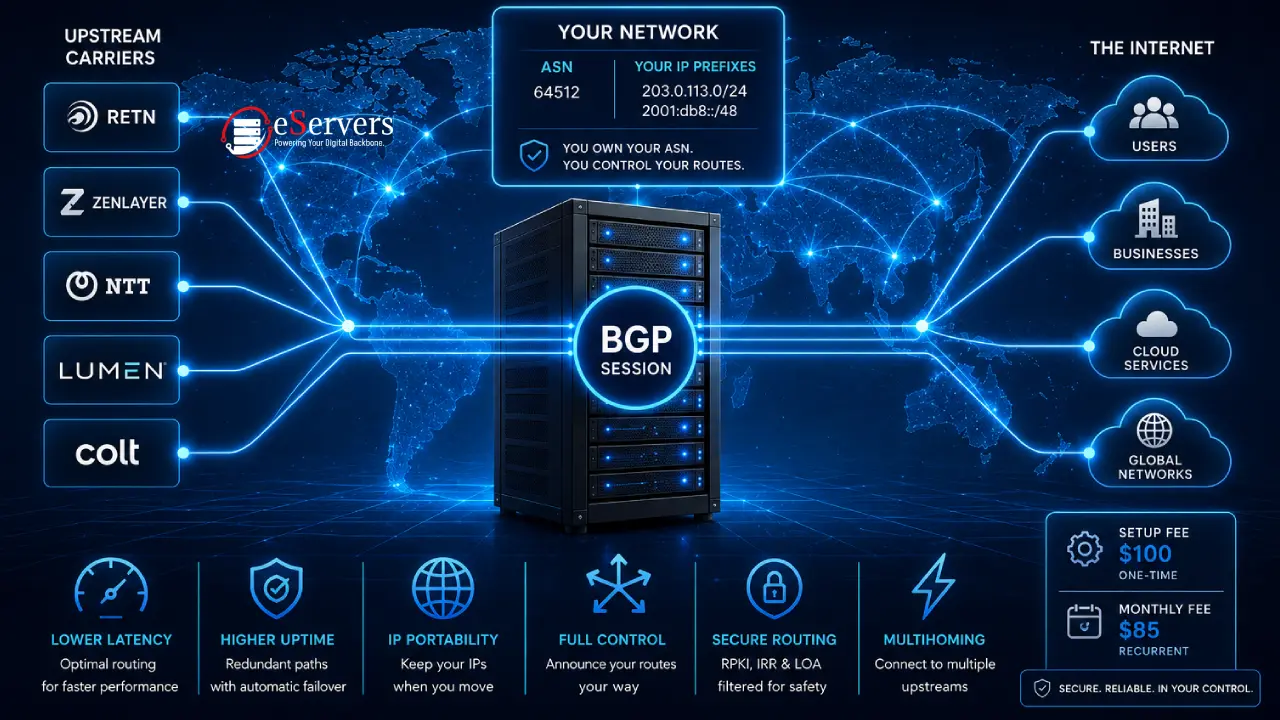
Without BGP, your traffic follows whatever default path your provider chooses. With your own BGP session, you can peer with multiple carriers and choose routes based on performance, not just cost. This is especially valuable if your users are spread across different regions and you want the shortest, fastest path to each one. eServers UK connects BGP customers to a network of established carriers, including Retn, Zenlayer, NTT, Lumen, and Colt, which helps keep routing paths short and consistent.
2. Redundancy and Failover
If one upstream connection fails, a properly configured BGP session automatically reroutes traffic through another available path. This is called multihoming, and it is one of the biggest reasons businesses invest in BGP peering. Instead of a single point of failure, your traffic has multiple ways to reach your server.
3. Provider Independence
Because your IP addresses and ASN belong to you, not your hosting provider, you keep full control of them even if you decide to switch providers later. This is known as IP portability, and it removes a common pain point where businesses feel locked into a provider simply because re-numbering their IP space would be too disruptive.
4. Improved Uptime and Reliability
By connecting to more than one upstream network, a BGP-enabled server is far less dependent on any single link staying online. Combined with DDoS protection, this creates a network setup that can absorb both hardware failures and malicious traffic spikes without taking your service offline.
5. Full Routing Authority
With BGP, you announce your own IP prefixes and decide your own routing policies. This level of control is typically used by businesses running their own infrastructure at scale — SaaS platforms, ISPs, managed hosting resellers, and enterprises with strict uptime requirements.
What You Need to Set Up BGP Peering
BGP peering is not something every website needs, and providers will usually check a few requirements before enabling it. At eServers UK, a BGP session requires:
A registered ASN – officially assigned to your organisation and verifiable through the regional internet registry.
Valid IP subnets – IPv4 and/or IPv6 ranges that are properly registered and linked to your ASN.
A Letter of Authorization (LOA) – a signed document that authorises the provider to announce your IP prefixes on your behalf. This step exists specifically to prevent route hijacking, where someone announces IP space they don't actually own.
Security in BGP Peering: Why It Cannot Be an Afterthought
BGP was designed decades ago, when the internet was a much smaller and more trusted place. Because of this, route security has become one of the most important parts of running a BGP session correctly. Two safeguards are especially important:
RPKI (Resource Public Key Infrastructure) – a cryptographic system that verifies whether a network is authorised to announce a particular IP prefix, helping prevent accidental or malicious route hijacks.
IRR (Internet Routing Registry) filtering – a database-driven filtering method that checks route announcements against publicly registered routing policies before accepting them.
eServers UK applies strict filtering based on both RPKI and IRR data, alongside LOA verification, so that only legitimate, authorised routes are accepted and announced on the network.
BGP Hosting with eServers UK
eServers UK offers BGP support on its dedicated servers using the current BGP-4 standard (RFC 4271), connected through an eBGP session. The service supports both IPv4 and IPv6, and includes:
Full routing control over your own IP prefixes
Multihoming support for redundancy
Secure route announcements filtered through LOA, RPKI, and IRR checks
The service is priced at $85 per month, with a one-time $100 setup fee covering initial configuration and testing. This is billed separately from your server's hosting plan and bandwidth usage.
The process to get started is straightforward:
Contact the sales team with your ASN and IP subnet details.
Submit a signed Letter of Authorization.
Pay the setup fee and first month's invoice.
Engineers configure and test the session, and your prefixes go live on the network.
BGP-enabled dedicated servers are available across eServers UK's data centre locations, including London, Manchester, Slough, Edinburgh, Portsmouth, Glasgow, and York.
Who Actually Needs BGP Peering?
BGP peering is not necessary for every project. It tends to make the most sense for:
Businesses running services where downtime directly costs revenue
Companies that want to keep their own IP space if they change providers
Organisations that need multihoming across several upstream carriers
Teams managing their own network infrastructure who need full routing control
If your website or application runs comfortably on standard hosting with good low latency infrastructure, you may not need your own BGP session yet. But as soon as uptime, redundancy, or route optimisation become business-critical, BGP peering becomes one of the most effective upgrades available.
Final Thoughts
BGP peering moves you from being a passenger on your hosting provider's network to being an active participant in how your traffic is routed. For businesses that rely on consistent uptime, fast global routing, and the freedom to change providers without losing their IP addresses, it is one of the most valuable additions to a dedicated server setup.
If you are considering BGP for your infrastructure, the team at eServers UK can review your ASN and subnet details and walk you through setup from start to finish.
Frequently Asked Questions (FAQ)
Does BGP peering slow down or speed up my server?
BGP itself does not add processing load to your server. What it changes is the routing path your traffic takes, which can reduce latency by avoiding congested or inefficient routes.
Can I use BGP peering without owning an ASN?
No. An ASN registered to your organisation is a core requirement, since it identifies your network on the internet and is what your IP prefixes are linked to.
Is BGP peering only for large enterprises?
Not necessarily. While large enterprises use it most often, any business that needs multihoming, IP portability, or independent routing control can benefit, provided they meet the ASN and IP subnet requirements.
What happens if my LOA is not provided?
Without a valid Letter of Authorization, a provider cannot legally announce your IP prefixes on their network, since doing so without authorisation could be considered route hijacking.
Discover eServers Dedicated Server Locations
eServers provides reliable dedicated servers across multiple global regions. Whether you need low latency, regional compliance, or proximity to your audience, our wide geographic coverage ensures the perfect hosting environment for your project.